Email Spoofing: Protection Strategies
Stop Email Spoofing with DMARC
Email spoofing is a problem that can affect any business, and it often starts with something very simple: an email that looks genuine when it is anything but. A criminal can send messages that appear to come from your domain, your staff, or your Microsoft 365 email — even though they were sent by someone else entirely. That can lead to phishing, fake invoices, damaged trust, and a great deal of confusion for the people receiving those messages. The good news is that there is a proven way to reduce this risk. DMARC, used alongside SPF and DKIM, helps other mail systems recognise which messages really belong to your business and what should happen to messages that do not. When it is set up properly, it becomes much harder for attackers to impersonate you and much easier for legitimate email to be trusted.
What is email spoofing?
Email spoofing happens when someone sends an email that looks as if it came from your business, even though it did not. To the person receiving it, the message may seem completely legitimate at first glance. That is what makes spoofing so effective. These messages are often used to trick people into paying fake invoices, sharing passwords, opening unsafe attachments, or following instructions they would normally question. In other words, a spoofed email borrows your good name to create trust where none should exist. That is why this is not just an issue for large organisations. If your business relies on email, your domain is worth protecting.
How DMARC helps stop impersonation
DMARC is a standard that helps receiving mail systems decide whether an email really came from your domain. It works with two other checks called SPF and DKIM. In simple terms, SPF helps confirm that the sending system is allowed to send mail for your domain, while DKIM helps confirm that the message has not been tampered with and is tied to your domain. DMARC brings those checks together and tells the receiving server what to do if a message does not pass. That might mean allowing it through, sending it to spam, or rejecting it altogether. It also provides reporting, which helps show who is sending email using your domain and whether anything needs attention.
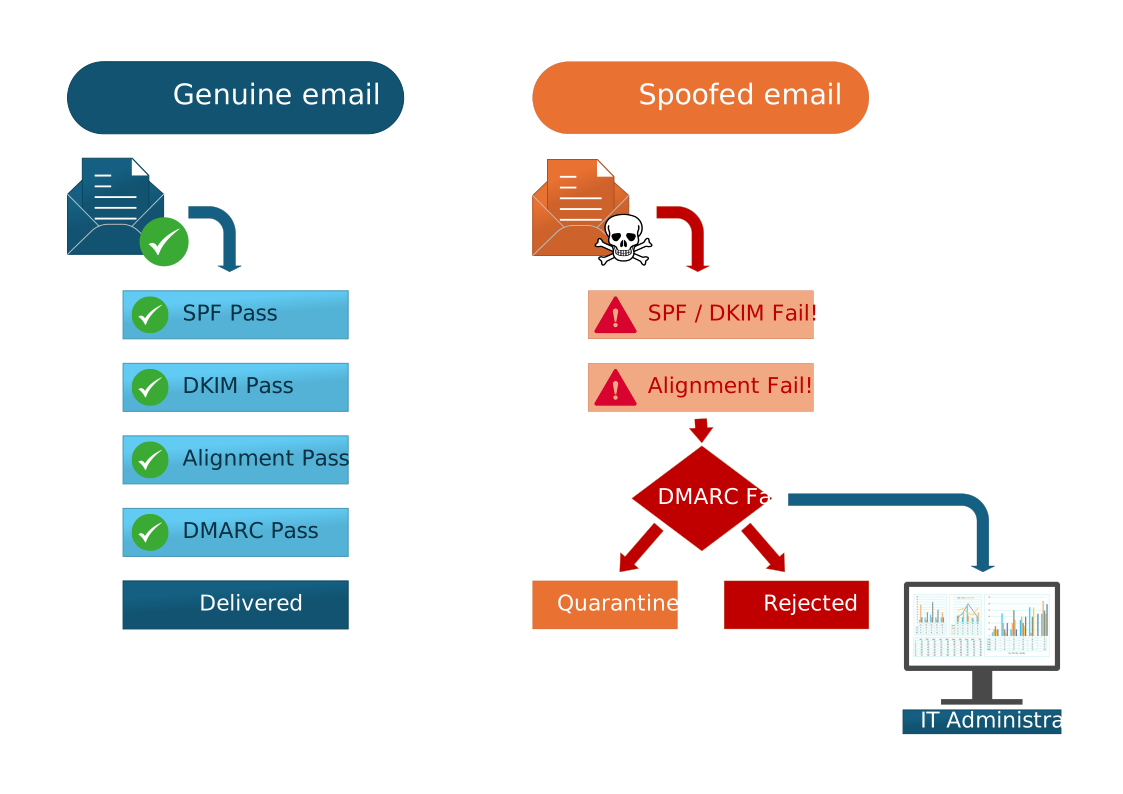
- A message claims to come from your domain.
- The receiving mail server checks your SPF record to see whether the sending source is authorised.
- It checks DKIM to see whether the message has a valid digital signature from your domain.
- It compares those authentication results with the domain shown in the visible From address.
- Your DMARC policy tells the receiver whether to monitor the message, send it to spam, or reject it outright if it fails.
- You receive reports that help identify legitimate senders, misconfigurations, and attempted abuse of your domain.
The diagram shows the two possible outcomes: a genuine email that is accepted, and a spoofed email that is flagged and stopped.
Why DMARC matters to any business
DMARC is not just something for large enterprises or high-volume senders. Any business that sends quotes, invoices, appointment confirmations, support replies, or general customer communication can be impersonated. A well-planned DMARC setup helps protect your reputation, reduces the risk of your domain being used in phishing attacks, and gives you better visibility into who is sending email on your behalf. It can also support better deliverability, because legitimate mail is easier for other systems to trust when your authentication is properly in place. The important thing is to introduce it carefully, so genuine mail is not disrupted while the settings are being tightened.
Why Microsoft 365 alone is not enough
Microsoft 365 includes useful protections for the mail coming into your organisation, but that does not automatically stop someone from pretending to be your domain when emailing people outside your business. To protect your domain properly, your SPF, DKIM, and DMARC settings need to be configured correctly across both Microsoft 365 and your DNS. In other words, the mailbox platform is only part of the picture. If the domain authentication side is not set up well, spoofing can still be a problem.
How we can help
Getting DMARC right is about more than adding a DNS record and hoping for the best. You need to know which services are genuinely allowed to send email for your domain, make sure SPF and DKIM are working as they should, and introduce DMARC in a way that strengthens protection without disrupting normal mail flow. That process can be straightforward when it is handled properly, but it does need care and experience.
We can help you review your current setup, identify the systems that are allowed to send mail for your domain, and configure SPF, DKIM, and DMARC properly. We can also make sure your Microsoft 365 environment and your DNS settings are working together the way they should. If we do not already manage your domain or your Microsoft 365 account, that is not a problem. We can still help with the setup, advise on any changes that are needed, and provide ongoing management if you would like us to take care of it for you.
Take the next step
If you are unsure whether your domain is properly protected, it may be worth taking a closer look. A review of your email authentication settings can quickly show whether your business is exposed to spoofing risk and what can be improved. If you would like help with DMARC — or if you would prefer someone to manage your domain and Microsoft 365 email security for you — we would be happy to assist.